When NetPlus loads for the first time, you are displayed with the Index Panel, Ticker, Main toolbar, Main Board, News & Announcements and the Status bulbs.
Work Area
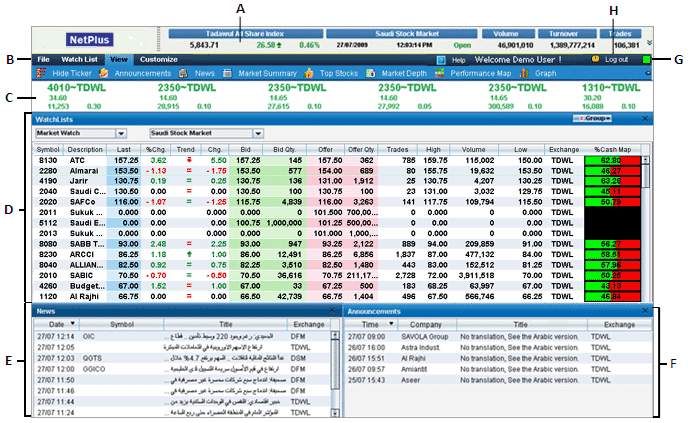
A: Index Panel B: Main toolbar C: Ticker D: Main Board E: News Panel F: Announcements Panel G: Status Bulb H: Log out button
Index Panel : Displays the market information related to the selected exchange.
Main toolbar : Contains the Main menus and options which provide quick access to all the main functionalities of NetPlus.
Ticker : Displays all trades of a selected Watch List.
Main Board : Displays real time market information for all symbols in the Market Watch or Watch Lists based on the selected option.
News Panel : Displays the latest news of the companies enlisted in the exchange.
Announcements Panel : Displays announcements made by companies of the selected exchange.
Status Bulb : Indicates the status of the connection to the Price server.
The Status Bulb can change into 3 different colours as given below:
|
Green Status Bulb – Indicates your connection to the server is enabled and you are receiving information in Pusher Mode. |
|
|
|
Yellow Status Bulb – Indicates your connection is in Web Mode and that data downloads will be a bit slower than in Pusher Mode. |
|
|
|
Red Status Bulb – Indicates your connection to the server is Lost. |
|


Note: By default you will receive real time data in Pusher Mode and your status bulb will be Green.
Log out button : Contains the Log out link.
Disclaimer:
The features available in the above interface may differ depending on your subscription.
Contact the Help Desk for further details.