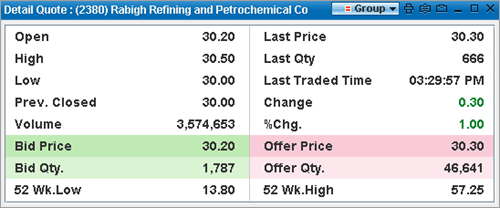
You can use the Detail Quote option on the right click menu of Market Watch and Watch Lists to view the Detail Quote of any required symbol. The Detail Quote window provides price and volume data, which are basically the most important information every investor needs to know in order to evaluate the performance of a security.
This feature gives you the ability to look at a detailed view of a symbol/company based on the latest information from the respective stock exchange. As the window is updated dynamically whenever new prices are received it helps you to make critical investment decisions.
To view the Detail Quote:
Method I
| • | Select the desired symbol row on a Watch List or Market Watch and double-click on it. |
| 1. | Select the desired symbol row and Right Click. |
| 2. | On the Right Click menu > Select Detail Quote. This displays the relevant Detail Quote window |
Detail Quote window