The Watch Lists lets you view a large number of stock quotes on a single window. Watch Lists are user definable and you may add symbols you wish to monitor on to the Watch List as and when required.
The application comes with two pre-created Watch Lists termed Watch List 1 and Watch List 2. By default, both Watch Lists are empty and a maximum of 50 symbols can be added to each of the Watch Lists.
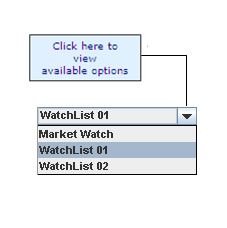
To select / switch between Watch Lists:
| 1. | Click the drop down list available on the Main Board. This displays the available options. |
| 2. | From the available options, select the required Watch List (Watch List 1 / Watch List 2). |
Select Watch List
You can setup your Watch Lists by:
To Add a symbol:
Method I
| 1. | Open the desired Watch List. |
| 2. | Click on the  button on the watch list panel. This displays the Symbol Search window. button on the watch list panel. This displays the Symbol Search window. |
Perform a Symbols Search to select and add the required symbols.
Method II
| 1. | Open the desired Watch List |
| 2. | Right click and select Add Symbol option. This displays the Symbol Search window. |
Perform a Symbols Search to select and add the required symbols.
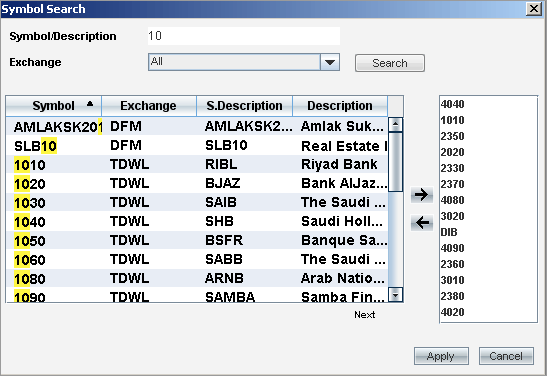
Symbol Search is useful when you want to add symbols to the Watch Lists. You can also use the Symbol Search to add multiple symbols in one go to the Watch List.
To perform a symbol search :
| 1. | In the Symbol Search window, enter the Symbol/Description. |
| 2. | Select the required Exchange from the drop down list. |
| 3. | Click on the Search button. |
| 4. | If matching symbols are found, they will be displayed |
| 5. | Select the desired symbol or range of symbols and then click  button to include the selected Symbols in the Selected Symbols area. button to include the selected Symbols in the Selected Symbols area. |
| 6. | Once you have finished selecting symbols, click on Apply. This includes all selected symbols in the Watch List. |
Symbol Search window
You may remove a symbol from a Watch List as and when required.
To remove a symbol/symbols from the Watch List:
Method I
| 1. | Open the desired Watch List. |
| 2. | Select the required symbol row/rows. |
Note: If you need to select more than one symbol row to be deleted in one go, simply hold down the Ctrl key and select the required symbol rows.
| 3. | Click on the  button on the watch list panel. This removes the selected symbol/symbols. button on the watch list panel. This removes the selected symbol/symbols. |
Method II
| 1. | Open the desired Watch List. |
| 2. | Select the required symbol row/rows. |
| 3. | Right-click on the required symbol row/rows and select Remove Symbol. This removes the selected symbol/symbols. |